Local SEO Schema Markup for Law Firms
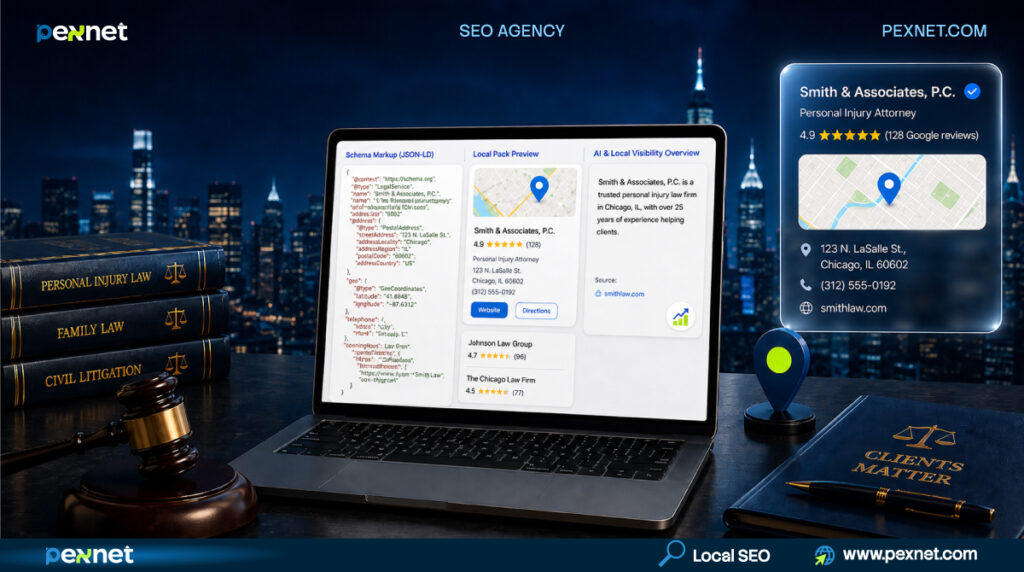
If your law firm isn’t showing up when someone searches for an attorney in your city, your schema markup is probably part of the problem.
After Google’s March 2026 core update, schema now does something completely different than it did just a year ago.
Here’s everything you need to know about local SEO schema markup for law firms. By the end you’ll know exactly which schema to add, which to remove, and what to ask your web team to fix this week.
What Is Local SEO Schema Markup for a Law Firm?
| Schema markup is invisible code that tells Google your firm is a law firm in your city, what cases you handle, who your attorneys are, and where to verify you. |
When someone visits your “Car Accident Lawyer” or “Divorce Attorney” page, it’s not only the visitor who reads the words, Google’s systems read them too – but the algorithm has to guess what the words mean.
Is “Phoenix” a city or a person’s name? Is the firm based in Atlanta, or just discussing an Atlanta case?
Well, Schema’s job is to remove the guessing.
Now in 2026, schema has more importance than rich snippets. It decides whether Google’s AI cites your firm when someone asks Gemini or ChatGPT a legal question, whether your firm wins the Local Pack, and whether Google treats you as a verified business entity.
If your competitor’s schema is doing this work and yours isn’t, you’re losing cases for sure. This is an integral part of local SEO for law firms.
What Changed in 2026 for Your Firm
Google’s March 2026 core update penalized firms that added schema to pages it didn’t describe.
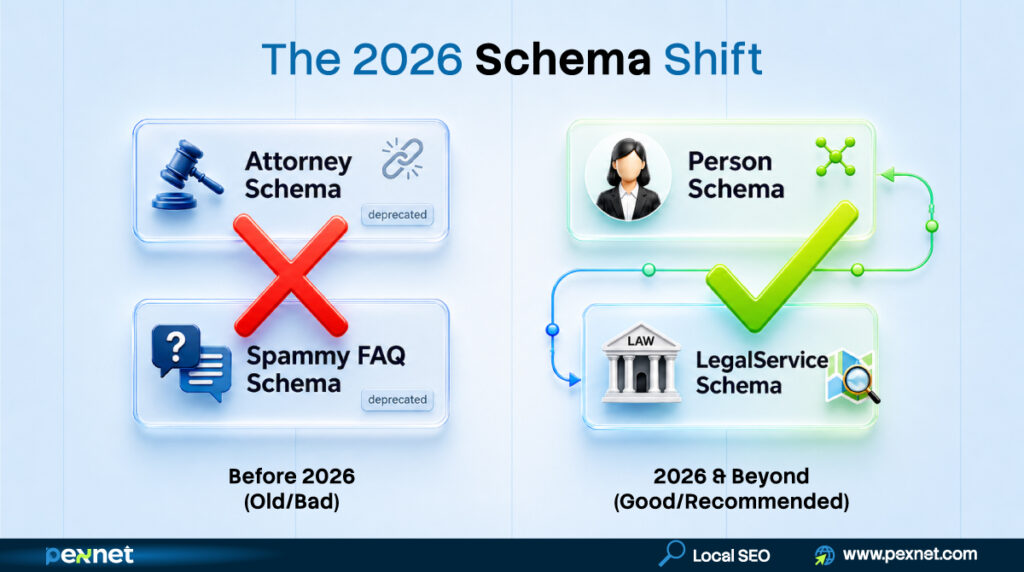
1. The “Attorney” Schema Type Is Officially Dead
If your website uses Attorney schema for bio pages, that’s a problem because Schema.org formally deprecated it.
Google now wants Person schema for individual attorneys and LegalService schema for law firms. Unfortunately, many older WordPress legal plugins still generate the old Attorney type, and they don’t know it’s broken.
2. Google Killed FAQ Rich Results for Marketing Sites
Your FAQ dropdowns disappeared from search results sometime in 2024-2025. Google restricted that feature to government and health authority sites. Your law firm doesn’t qualify.
Yes, the schema still has value for AI search citations, but not for the SERP look you might be paying for.
3. The March 2026 Update Enforced “Schema Honesty”
This is the big one. Google now requires your schema to describe what the page is really about.
If your “Personal Injury Lawyer” practice area page has a small FAQ section at the bottom and you’ve wrapped it in FAQPage schema, that’s now ineligible. In fact, there’s a real risk of a manual review flag.
Schema now must match the page’s primary purpose. If a vendor sold you “FAQ schema on every page” in 2023-2024, that work might be actively hurting you now.
Why Schema Matters for Your Law Firm Specifically
| Schema decides whether you win the Local Pack and whether AI tools cite your firm when potential clients research their case. Your schema needs to serve both since two different types of searchers have to find your firm now. |
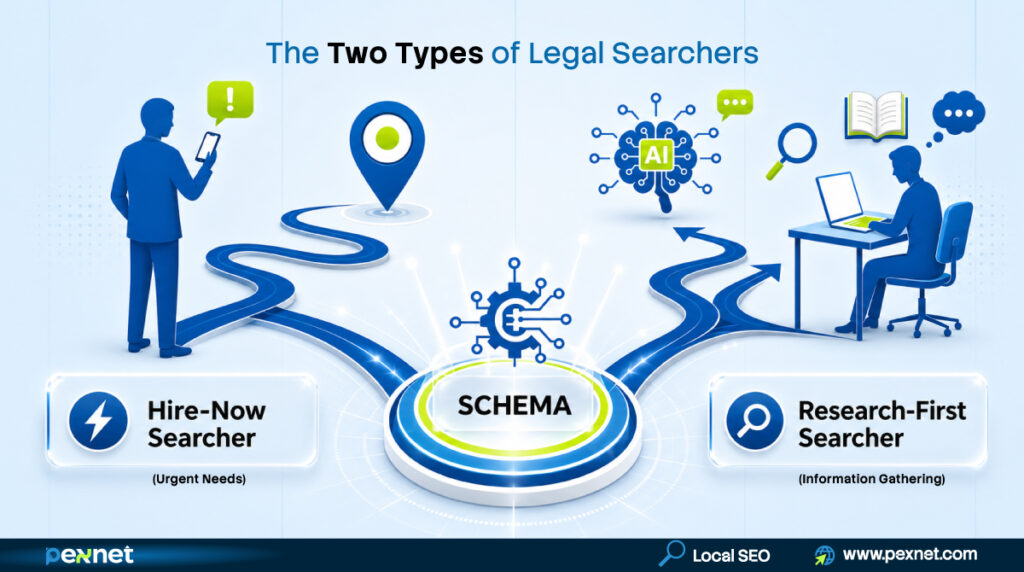
The Hire-Now Searcher
They type “personal injury attorney near me” or “DUI lawyer their (city).” Ready to call, they’re scared, hurt, or in legal trouble. Over 60% of clicks on these searches go to the Local Pack.
Schema doesn’t directly rank you in the Local Pack, your Google Business Profile (GBP) does. But Google now cross-references your website’s schema against your GBP to verify you’re really who you say you are.
When your LegalService schema lists your service area cities and your GBP confirms the same, Google trusts you more.
(For the citation side of this puzzle, see local citation building for law firms.)
The Research-First Searcher
They type “what to do after a car accident” or “how long do I have to file a personal injury claim in [their state].” They’re 48 hours into a problem and building a mental shortlist of firms they trust.
These searches now usually trigger Google’s AI Mode or AI Overview in 2026. Pages with clean schema get cited in those answers at roughly 3-5x the rate of pages without it. The firm cited in the AI answer wins trust before the searcher ever types “lawyer.”
Why Legal Content Faces Stricter Scrutiny (YMYL)
Did you know law firm content sits in Google’s “Your Money or Your Life” category? It’s the strictest quality scrutiny of any niche.
In February 2026, Google added a dedicated “Authors” section to its Search Central documentation.
So, every blog should have a real attorney attached as author, with bar credentials machine-verifiable through schema. This applies whether you practice in Texas, California, Florida, or New York.
Types Schema Your Law Firm Needs
Here comes the 11 schema types worth knowing. Start at the top, work down. Don’t touch anything below row 6 until rows 1-6 are clean.
| Schema Type | Priority | What It Does |
| LegalService | ✅ Do first | Foundation. Marks your firm as a legal business in your city. Goes on homepage. |
| Organization | ✅ Do with #1 | Pairs with LegalService in same homepage @graph. Builds Knowledge Graph entry. |
| Person | ✅ Do third | One per attorney bio. Highest E-E-A-T impact. Replaces deprecated Attorney type. |
| Service | ✅ Do fourth | One per practice area page. Maps to revenue-driving keywords. |
| BreadcrumbList | ✅ Do fifth | Site-wide quick win. Still produces rich results in 2026. |
| Article + Author Person | ✅ For blog | Mandatory for YMYL after Feb 2026. |
| FAQPage | ⚠️ Conditional | Dedicated FAQ page only. Never on practice area pages. |
| AggregateRating | ⚠️ Risky | Manual action + state bar compliance risk. Let GBP handle reviews. |
| Attorney (deprecated) | ❌ Remove | Replace with Person + LegalService. |
| HowTo | ❌ Skip | Rich result killed in 2023. |
| Speakable | ❌ Skip | News-publisher feature only. |
Note: the order matters.
If you add schema everywhere at once, you’ll end up with broken connections – Person schemas not linked to a firm, Service pages with no provider, blog Articles with no author. Build foundation (rows 1-2), attach attorneys (3), services (4), then everything else.
Here are a few quick rules:
- LegalService beats generic LocalBusiness (Google favors specific subtypes).
- Person replaces Attorney with jobTitle like “Family Law Attorney” or “Criminal Defense Attorney” – never just “Lawyer.”
- Each practice area gets its own Service schema – PI firms mark up car accidents, slip and fall, wrongful death separately; family firms mark up divorce, custody, prenups separately; criminal firms mark up DUI, drug charges, assault separately; estate firms mark up wills, trusts, probate separately.
- Don’t self-apply AggregateRating – it triggers Google’s manual review and can violate your state bar’s advertising rules around unverifiable testimonials.
Which Schema Goes on Which Page (Page-by-Page Breakdown)
Remember, every page type has its own ideal schema combination. Your developer needs this cheat sheet with best practices + ready-to-deploy code for every page type.
1. Homepage
Schemas: LegalService + Organization (combined @graph)
The foundation: every other page’s schema references it via @id. Skip BreadcrumbList and FAQPage here.
<script type="application/ld+json">
{
  "@context": "https://schema.org",
  "@graph": [
    {
      "@type": "LegalService",
      "@id": "https://www.[yourfirm].com/#firm",
      "name": "[Your Firm Name]",
      "url": "https://www.[yourfirm].com",
      "logo": "https://www.[yourfirm].com/images/logo.png",
      "image": "https://www.[yourfirm].com/images/office-front.jpg",
      "description": "[Your City] [practice area] law firm representing clients across [Your County] and the greater [Your City] area.",
      "telephone": "+1-[area-code]-[number]",
      "priceRange": "Free Consultation",
      "address": {
        "@type": "PostalAddress",
        "streetAddress": "[Your Street Address]",
        "addressLocality": "[Your City]",
        "addressRegion": "[Your State Abbreviation]",
        "postalCode": "[Your ZIP]",
        "addressCountry": "US"
      },
      "geo": {
        "@type": "GeoCoordinates",
        "latitude": [your-latitude-5-decimals],
        "longitude": [your-longitude-5-decimals]
      },
      "openingHoursSpecification": [{
        "@type": "OpeningHoursSpecification",
        "dayOfWeek": ["Monday","Tuesday","Wednesday","Thursday","Friday"],
        "opens": "08:00",
        "closes": "18:00"
      }],
      "areaServed": [
        {"@type": "City", "name": "[Your Primary City]"},
        {"@type": "City", "name": "[Nearby City 1]"},
        {"@type": "City", "name": "[Nearby City 2]"},
        {"@type": "AdministrativeArea", "name": "[Your County]"}
      ],
      "knowsAbout": [
        "[Your State] [practice area] law",
        "[Specific case type 1]",
        "[Specific case type 2]",
        "[Your State Statute Reference]"
      ],
      "sameAs": [
        "https://www.google.com/maps/place/[your-gbp-url]",
        "https://www.linkedin.com/company/[your-firm]",
        "https://www.avvo.com/attorneys/[your-profile]",
        "https://www.justia.com/lawyers/[your-profile]",
        "https://www.bbb.org/[your-bbb-profile]"
      ]
    },
    {
      "@type": "Organization",
      "@id": "https://www.[yourfirm].com/#organization",
      "name": "[Your Firm Name]",
      "url": "https://www.[yourfirm].com",
      "logo": {"@type": "ImageObject", "url": "https://www.[yourfirm].com/images/logo.png"},
      "sameAs": [
        "https://www.linkedin.com/company/[your-firm]",
        "https://www.facebook.com/[your-firm]"
      ]
    }
  ]
}
</script>
2. Practice Area Pages
Schemas: Service + BreadcrumbList
provider links to your homepage’s LegalService @id. Service name includes the city; areaServed matches the city or county the page targets.
Never add FAQPage schema here, even with FAQs at the bottom because manual review risk after March 2026.
<script type="application/ld+json">
{
  "@context": "https://schema.org",
  "@graph": [
    {
      "@type": "Service",
      "@id": "https://www.[yourfirm].com/practice-areas/[practice-slug]/#service",
      "name": "[Your City] [Practice Area] Legal Representation",
      "description": "[Brief 1-2 sentence description mentioning your city and state].",
      "serviceType": "[e.g. Personal Injury Law / Family Law / Criminal Defense / Estate Planning]",
      "provider": {"@id": "https://www.[yourfirm].com/#firm"},
      "areaServed": [
        {"@type": "City", "name": "[Your Primary City]"},
        {"@type": "City", "name": "[Nearby City 1]"},
        {"@type": "AdministrativeArea", "name": "[Your County]"}
      ],
      "audience": {
        "@type": "Audience",
        "audienceType": "[e.g. accident victims / divorcing spouses / criminal defendants / estate planners]"
      },
      "offers": {
        "@type": "Offer",
        "priceSpecification": {"@type": "PriceSpecification", "price": "0", "priceCurrency": "USD"},
        "description": "Free initial consultation"
      }
    },
    {
      "@type": "BreadcrumbList",
      "itemListElement": [
        {"@type": "ListItem", "position": 1, "name": "Home", "item": "https://www.[yourfirm].com"},
        {"@type": "ListItem", "position": 2, "name": "Practice Areas", "item": "https://www.[yourfirm].com/practice-areas/"},
        {"@type": "ListItem", "position": 3, "name": "[Practice Area]", "item": "https://www.[yourfirm].com/practice-areas/[practice-slug]/"}
      ]
    }
  ]
}
</script>
3. Attorney Bio Pages
Schemas: Person + BreadcrumbList
This is the single most important schema for YMYL content. worksFor links to your firm’s @id. hasCredential is machine-readable proof of bar admission.
The 8-10 sameAs URLs build entity verification — when Google sees the same attorney on your state bar’s website, LinkedIn, Avvo, and Super Lawyers, AI Mode citation confidence climbs sharply. [#future-link: Attorney bio page SEO checklist]
<script type="application/ld+json">
{
  "@context": "https://schema.org",
  "@graph": [
    {
      "@type": "Person",
      "@id": "https://www.[yourfirm].com/attorneys/[attorney-slug]#person",
      "name": "[Attorney Full Name]",
      "givenName": "[First Name]",
      "familyName": "[Last Name]",
      "jobTitle": "[e.g. Personal Injury Attorney]",
      "image": "https://www.[yourfirm].com/images/[attorney-photo].jpg",
      "url": "https://www.[yourfirm].com/attorneys/[attorney-slug]",
      "description": "[1-2 sentence bio summary].",
      "worksFor": {"@id": "https://www.[yourfirm].com/#firm"},
      "alumniOf": [
        {"@type": "EducationalOrganization", "name": "[Law School Name]"},
        {"@type": "EducationalOrganization", "name": "[Undergraduate University]"}
      ],
      "hasCredential": [
        {
          "@type": "EducationalOccupationalCredential",
          "credentialCategory": "license",
          "name": "[Your State] State Bar Admission",
          "recognizedBy": {"@type": "Organization", "name": "State Bar of [Your State]"}
        },
        {
          "@type": "EducationalOccupationalCredential",
          "credentialCategory": "degree",
          "name": "Juris Doctor"
        }
      ],
      "knowsAbout": ["[Focus area 1]", "[Focus area 2]", "[Focus area 3]"],
      "knowsLanguage": ["English", "[Other Language If Applicable]"],
      "sameAs": [
        "https://www.[your-state-bar].org/[attorney-profile]",
        "https://www.linkedin.com/in/[attorney-linkedin]",
        "https://www.avvo.com/attorneys/[attorney-avvo]",
        "https://www.justia.com/lawyers/[attorney-justia]",
        "https://lawyers.findlaw.com/profile/[attorney-findlaw]",
        "https://www.martindale.com/[attorney-martindale]",
        "https://profiles.superlawyers.com/[your-state]/[your-city]/lawyer/[attorney-name]",
        "https://www.[local-bar-association].org/[member-profile]"
      ]
    },
    {
      "@type": "BreadcrumbList",
      "itemListElement": [
        {"@type": "ListItem", "position": 1, "name": "Home", "item": "https://www.[yourfirm].com"},
        {"@type": "ListItem", "position": 2, "name": "Attorneys", "item": "https://www.[yourfirm].com/attorneys/"},
        {"@type": "ListItem", "position": 3, "name": "[Attorney Name]", "item": "https://www.[yourfirm].com/attorneys/[attorney-slug]/"}
      ]
    }
  ]
}
</script>
4. About Page
Schemas: AboutPage + BreadcrumbList
It’s lower-priority than you may think. AboutPage with mainEntity pointing to your firm’s LegalService @id reinforces entity consolidation.
Never copy your homepage’s full LegalService schema here – duplicate entity declarations confuse Google.
<script type="application/ld+json">
{
  "@context": "https://schema.org",
  "@graph": [
    {
      "@type": "AboutPage",
      "@id": "https://www.[yourfirm].com/about/#aboutpage",
      "url": "https://www.[yourfirm].com/about/",
      "name": "About [Your Firm Name]",
      "description": "Learn about [Your Firm Name], a [Your City] [practice area] law firm serving clients since [year].",
      "mainEntity": {"@id": "https://www.[yourfirm].com/#firm"},
      "isPartOf": {"@id": "https://www.[yourfirm].com/#firm"}
    },
    {
      "@type": "BreadcrumbList",
      "itemListElement": [
        {"@type": "ListItem", "position": 1, "name": "Home", "item": "https://www.[yourfirm].com"},
        {"@type": "ListItem", "position": 2, "name": "About", "item": "https://www.[yourfirm].com/about/"}
      ]
    }
  ]
}
</script>
5. Contact Page
Schemas: ContactPage + LegalService (mirror of homepage with same @id)
One of the few places mirroring your homepage’s LegalService is correct – Google often pulls phone, address, and hours from the contact page for knowledge panel data.
Use the exact same @id as your homepage. Address, phone, and hours must match character-for-character to your homepage AND your GBP listing – this is where most NAP mismatches happen.
<script type="application/ld+json">
{
  "@context": "https://schema.org",
  "@graph": [
    {
      "@type": "ContactPage",
      "@id": "https://www.[yourfirm].com/contact/#contactpage",
      "url": "https://www.[yourfirm].com/contact/",
      "name": "Contact [Your Firm Name]",
      "mainEntity": {"@id": "https://www.[yourfirm].com/#firm"}
    },
    {
      "@type": "LegalService",
      "@id": "https://www.[yourfirm].com/#firm",
      "name": "[Your Firm Name]",
      "telephone": "+1-[area-code]-[number]",
      "email": "[[email protected]]",
      "address": {
        "@type": "PostalAddress",
        "streetAddress": "[Your Street Address]",
        "addressLocality": "[Your City]",
        "addressRegion": "[Your State Abbreviation]",
        "postalCode": "[Your ZIP]",
        "addressCountry": "US"
      },
      "geo": {
        "@type": "GeoCoordinates",
        "latitude": [your-latitude-5-decimals],
        "longitude": [your-longitude-5-decimals]
      },
      "openingHoursSpecification": [{
        "@type": "OpeningHoursSpecification",
        "dayOfWeek": ["Monday","Tuesday","Wednesday","Thursday","Friday"],
        "opens": "08:00",
        "closes": "18:00"
      }],
      "contactPoint": [{
        "@type": "ContactPoint",
        "telephone": "+1-[area-code]-[number]",
        "contactType": "Legal Consultation",
        "areaServed": "US",
        "availableLanguage": ["English"]
      }]
    },
    {
      "@type": "BreadcrumbList",
      "itemListElement": [
        {"@type": "ListItem", "position": 1, "name": "Home", "item": "https://www.[yourfirm].com"},
        {"@type": "ListItem", "position": 2, "name": "Contact", "item": "https://www.[yourfirm].com/contact/"}
      ]
    }
  ]
}
</script>
6. Blogs
Schemas: Article + Author (Person reference) + BreadcrumbList
After Google’s February 2026 Authors update, every legal blog post now needs Article schema with author referencing a real attorney’s Person @id — not “Admin,” not your marketing manager. The chain: Article → author → Person @id → hasCredential → worksFor → LegalService @id. Required fields: datePublished, dateModified, headline, author.
<script type="application/ld+json">
{
  "@context": "https://schema.org",
  "@graph": [
    {
      "@type": "Article",
      "@id": "https://www.[yourfirm].com/blog/[post-slug]/#article",
      "url": "https://www.[yourfirm].com/blog/[post-slug]/",
      "headline": "[Blog Post Title — 60 chars max]",
      "description": "[Meta description, 150-160 characters]",
      "image": ["https://www.[yourfirm].com/images/blog/[featured-image].jpg"],
      "datePublished": "2026-04-28T08:00:00-05:00",
      "dateModified": "2026-04-28T08:00:00-05:00",
      "author": {"@id": "https://www.[yourfirm].com/attorneys/[attorney-slug]#person"},
      "publisher": {"@id": "https://www.[yourfirm].com/#firm"},
      "mainEntityOfPage": {"@type": "WebPage", "@id": "https://www.[yourfirm].com/blog/[post-slug]/"},
      "articleSection": "[e.g. Personal Injury / Family Law / Criminal Defense]",
      "keywords": "[keyword 1], [keyword 2], [keyword 3]",
      "wordCount": [actual-word-count]
    },
    {
      "@type": "BreadcrumbList",
      "itemListElement": [
        {"@type": "ListItem", "position": 1, "name": "Home", "item": "https://www.[yourfirm].com"},
        {"@type": "ListItem", "position": 2, "name": "Blog", "item": "https://www.[yourfirm].com/blog/"},
        {"@type": "ListItem", "position": 3, "name": "[Post Title]", "item": "https://www.[yourfirm].com/blog/[post-slug]/"}
      ]
    }
  ]
}
</script>
7. FAQ Page (Dedicated)
Schemas: FAQPage + BreadcrumbList
Use it only on a page where Q&A is the main content. Never on a practice area page with a few FAQs at the bottom.
Even though FAQPage no longer triggers rich results for marketing sites, it still feeds AI Mode citation extraction at 3-5x. Every Q&A in the schema must be visibly present on the page since hidden FAQs trigger the March 2026 schema honesty penalty.
<script type="application/ld+json">
{
  "@context": "https://schema.org",
  "@graph": [
    {
      "@type": "FAQPage",
      "@id": "https://www.[yourfirm].com/faq/#faqpage",
      "url": "https://www.[yourfirm].com/faq/",
      "name": "Frequently Asked Questions | [Your Firm Name]",
      "mainEntity": [
        {
          "@type": "Question",
          "name": "[Question 1, exactly as it appears on the page]",
          "acceptedAnswer": {
            "@type": "Answer",
            "text": "[Full answer text, 50-300 words.]",
            "author": {"@id": "https://www.[yourfirm].com/attorneys/[attorney-slug]#person"}
          }
        },
        {
          "@type": "Question",
          "name": "[Question 2]",
          "acceptedAnswer": {
            "@type": "Answer",
            "text": "[Full answer text]",
            "author": {"@id": "https://www.[yourfirm].com/attorneys/[attorney-slug]#person"}
          }
        }
      ],
      "about": {"@id": "https://www.[yourfirm].com/#firm"}
    },
    {
      "@type": "BreadcrumbList",
      "itemListElement": [
        {"@type": "ListItem", "position": 1, "name": "Home", "item": "https://www.[yourfirm].com"},
        {"@type": "ListItem", "position": 2, "name": "FAQ", "item": "https://www.[yourfirm].com/faq/"}
      ]
    }
  ]
}
</script>
8. Case Studies / Case Results
Schemas: Article + Author (Person) + BreadcrumbList
Don’t forget to treat every case study like a blog post. Don’t use AggregateRating or Review schema even with client testimonials – state bar compliance trap.
If your case study includes settlement figures, check your state bar advertising rules; required disclaimers must be visible on the page (not hidden in schema).
<script type="application/ld+json">
{
  "@context": "https://schema.org",
  "@graph": [
    {
      "@type": "Article",
      "@id": "https://www.[yourfirm].com/case-results/[case-slug]/#article",
      "url": "https://www.[yourfirm].com/case-results/[case-slug]/",
      "headline": "[Case Result Title — e.g. $1.2M Settlement for [Practice Area] Client]",
      "description": "[Brief description of the case outcome]",
      "image": "https://www.[yourfirm].com/images/case-results/[image].jpg",
      "datePublished": "2026-04-28T08:00:00-05:00",
      "dateModified": "2026-04-28T08:00:00-05:00",
      "author": {"@id": "https://www.[yourfirm].com/attorneys/[attorney-slug]#person"},
      "publisher": {"@id": "https://www.[yourfirm].com/#firm"},
      "mainEntityOfPage": {"@type": "WebPage", "@id": "https://www.[yourfirm].com/case-results/[case-slug]/"},
      "articleSection": "Case Results",
      "about": {
        "@type": "Service",
        "name": "[Practice Area]",
        "provider": {"@id": "https://www.[yourfirm].com/#firm"}
      }
    },
    {
      "@type": "BreadcrumbList",
      "itemListElement": [
        {"@type": "ListItem", "position": 1, "name": "Home", "item": "https://www.[yourfirm].com"},
        {"@type": "ListItem", "position": 2, "name": "Case Results", "item": "https://www.[yourfirm].com/case-results/"},
        {"@type": "ListItem", "position": 3, "name": "[Case Title]", "item": "https://www.[yourfirm].com/case-results/[case-slug]/"}
      ]
    }
  ]
}
</script>
9. Multi-Office Location Pages
Schemas: LegalService with a unique @id per location + BreadcrumbList
Every location page needs its own LegalService schema with a different @id value.
Here’s the most common mistake: developers copy the homepage schema everywhere, leaving the same @id — Google sees three pages claiming to be the same entity, trust collapses. The parentOrganization link to your homepage @id tells Google these are sister offices, not separate firms.
<script type="application/ld+json">
{
  "@context": "https://schema.org",
  "@graph": [
    {
      "@type": "LegalService",
      "@id": "https://www.[yourfirm].com/[city-slug]/#location",
      "name": "[Your Firm Name] - [City Name] Office",
      "url": "https://www.[yourfirm].com/[city-slug]/",
      "image": "https://www.[yourfirm].com/images/[city]-office.jpg",
      "description": "[Your Firm Name]'s [City] office serves clients across [City] and [County] with [practice area] representation.",
      "telephone": "+1-[city-specific-phone]",
      "address": {
        "@type": "PostalAddress",
        "streetAddress": "[City-Specific Street Address]",
        "addressLocality": "[City Name]",
        "addressRegion": "[State Abbreviation]",
        "postalCode": "[City ZIP]",
        "addressCountry": "US"
      },
      "geo": {
        "@type": "GeoCoordinates",
        "latitude": [city-specific-latitude],
        "longitude": [city-specific-longitude]
      },
      "openingHoursSpecification": [{
        "@type": "OpeningHoursSpecification",
        "dayOfWeek": ["Monday","Tuesday","Wednesday","Thursday","Friday"],
        "opens": "08:00",
        "closes": "18:00"
      }],
      "areaServed": [
        {"@type": "City", "name": "[This City]"},
        {"@type": "City", "name": "[Nearby City 1]"},
        {"@type": "AdministrativeArea", "name": "[This County]"}
      ],
      "parentOrganization": {"@id": "https://www.[yourfirm].com/#firm"},
      "sameAs": ["https://www.google.com/maps/place/[city-specific-gbp-url]"]
    },
    {
      "@type": "BreadcrumbList",
      "itemListElement": [
        {"@type": "ListItem", "position": 1, "name": "Home", "item": "https://www.[yourfirm].com"},
        {"@type": "ListItem", "position": 2, "name": "Locations", "item": "https://www.[yourfirm].com/locations/"},
        {"@type": "ListItem", "position": 3, "name": "[City Name] Office", "item": "https://www.[yourfirm].com/[city-slug]/"}
      ]
    }
  ]
}
</script>
10. Pages That Need No Schema
Don’t force schema everywhere.
Skip on:
- Testimonials pages (Review/AggregateRating compliance risk),
- Privacy policy and ToS (no entity), thank-you/confirmation pages (transient, often noindex),
- Internal search results,
- Tag/category archives (canonical pages carry the schema),
- 404 pages.
Note: Schema should always describe a real entity – firm, attorney, service, article, FAQ.
Implementation order: Build top-to-bottom. Homepage first, then Practice Areas, then Attorney Bios, then everything else. The @id references in later schemas depend on earlier schemas existing.
How to Add Schema to Your Site
| WordPress plugins handle the basics while Custom JSON-LD wins competitive markets. On the other hand, AI tools generate decent drafts but miss legal-industry nuance. |
1. WordPress plugins (Yoast, Rank Math, Schema Pro)
They handle baseline Organization, Article, and BreadcrumbList. Fine starting point. But they generate generic markup, won’t produce LegalService-specific schema with proper areaServed, won’t connect attorney Person schema via @id, and won’t include the legal-industry sameAs URLs that matter.
2. AI tools (ChatGPT, Claude, Gemini)
They produce structurally valid JSON-LD with complete inputs — usually 70% of the way there. They miss the deprecated Attorney warning, @id graph stacking, and complete legal sameAs URLs. Treat output as a draft. Validate before deploying.
3. Custom JSON-LD
They’re best for competitive markets – major metros, popular practice areas, or expensive cases. You control the @id graph, areaServed precision, complete sameAs array, and knowsAbout topical claims. Best hybrid: plugin for site wide baseline, custom JSON-LD for high value pages. (See our full law firm SEO services).
How to Test & Monitor Your Schema
| Validate every schema block in Google’s Rich Results Test before deploying, then audit quarterly using Search Console. |
After your developer adds schema: Google Rich Results Test (paste each URL — “Eligible” + “Valid” both required), Schema.org Validator (catches strict-spec issues), Screaming Frog or Sitebulb (full-site crawl finds missing or broken JSON-LD), Google Search Console > Enhancements (monitor weeks for impressions and clicks).
Schema isn’t set-and-forget anymore. Google deprecates types, tightens eligibility, and your firm changes – new attorneys, practice areas, offices. Quarterly audit catches drift before it costs ranking.
How to See What Your Competitors Are Using
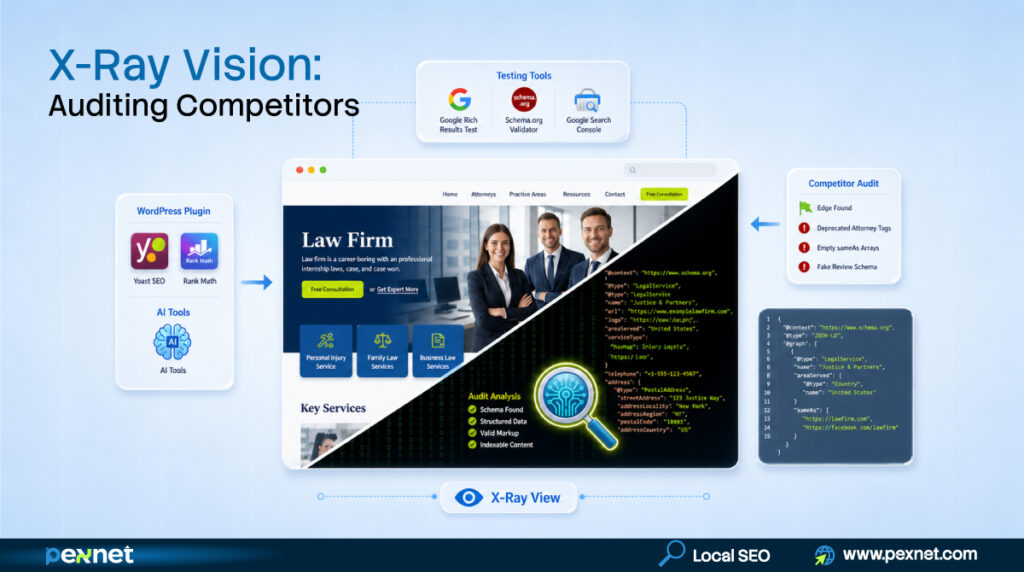
It’s easy. Pick a firm in your city ranking ahead of you.
Open their homepage in Chrome, right-click → View Page Source, Cmd+F / Ctrl+F for application/ld+json.
Read each JSON-LD block. Then run their URL through Google’s Rich Results Test.
Look for: deprecated Attorney type still in use (your opportunity), missing Person schema on bios (easy authority win), thin sameAs array (you have 10, they have 2), no @id stacking (you connect the graph, they don’t). Each gap is your opening.
Schema Mistakes Hurting Law Firms in 2026
Here are the six most costly mistakes on U.S. law firm sites today:
- Deprecated Attorney schema – replace with Person + LegalService. Same-day fix.
- Self-applied AggregateRating – manual review trigger plus state bar advertising risk. Let GBP handle reviews.
- FAQPage schema on practice area pages – ineligible and risky after March 2026.
- NAP mismatch across schema, GBP, Avvo, and footer — the silent killer. One inconsistency drops AI Mode confidence.
- Identical @id across multi-office location pages – entity collision. Each location needs unique @id.
- Schema describing content not visibly on the page – Google’s March 2026 update specifically targets this.
How Long Until Schema Affects Your Visibility?
Schema is a long-game investment; i.e., firms implementing schema now will be compounding returns by Q4 2026.
- BreadcrumbList rich results show in 2-4 weeks.
- Local Pack improvements take 4-8 weeks.
- AI Mode citations take 4-8 weeks for established firms, 3-6 months for newer ones.
- Knowledge Graph entity recognition takes 6-12 weeks (faster with strong sameAs).
Stop Losing Cases to Firms with Better Schema
In 2026, Schema markup is an entity verification investment and competitors who figured this out in 2024 are pulling further ahead every month.
Every local search where you don’t appear in the Local Pack, every AI Mode answer citing a competitor instead of you, is a case you didn’t get to compete for.
Pexnet builds local SEO schema markup for law firms competing in U.S. legal markets. We can audit your current implementation against 2026 standards, identify ranking gaps, and deploy custom JSON-LD designed for Local Pack dominance and AI Mode citation eligibility. (See how we grew a law firm from 0 to 5K monthly traffic in 6 months →).
Whether you practice personal injury, family law, criminal defense, or estate planning anywhere in the U.S., the same fundamentals apply.
FAQs

Riadul Islam
Riad is a Senior SEO Consult who lives and breathes all things SEO. With 11 years of SEO experience under his belt, he’s now deeply involved in applying AI search technology and data science into niche-specific SEO. He’s an active member of top SEO forums to keep his strategic thinking, problem-solving, and creativity supercharged.